
Our AI Recommendations Engine allows you to configure your own Matching Programs with custom rules. Many of our customers use this for things like custom Mentorship Programs, matchmaking for "Lunch Roulette" type programs, and Networking Recommendations.
To configure these:
- Enter Admin
- head into Settings > Configuration
- look for AI Recommendations
In there, you will be able to set up a Member <> Member Matching Program that allows your Members to get recommended each other to connect.
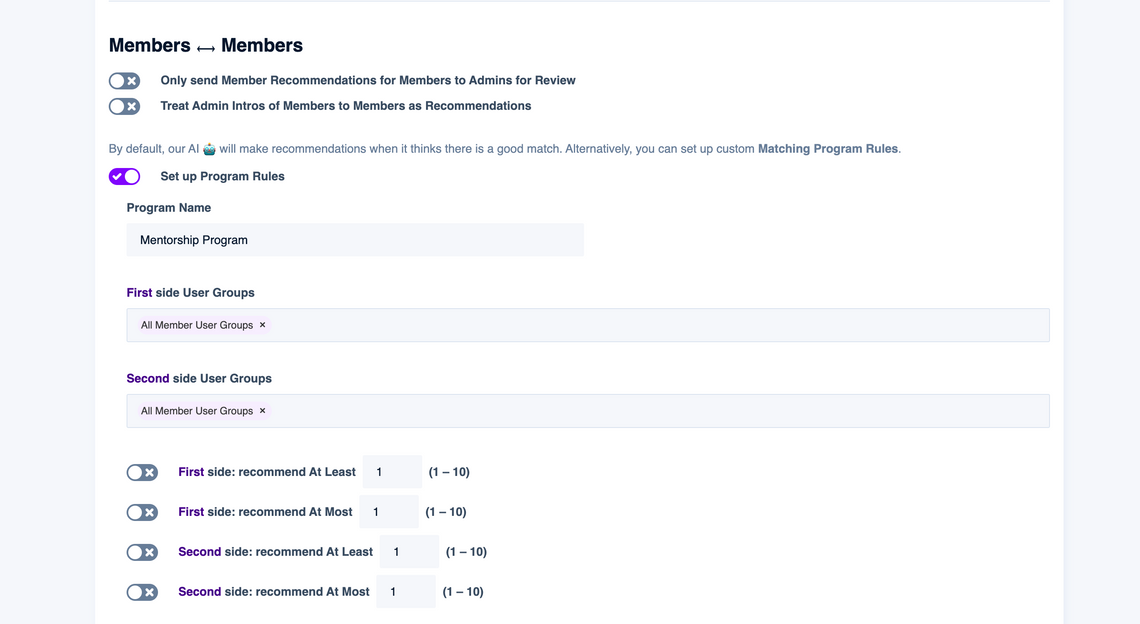
Here are what all the settings here do:
Only send Member Recommendations for Members to Admins for Review – Select this option if you only want our AI Engine to make Recommendations to your Admins & Moderators team under the Manage > Members dashboard. From that point on, your team can review these, and either manually make introductions or setup automated one-click workflows on ScaleGrowth to do this. If you leave this option un-selected, the Recommendations from the program will go directly to the end-user Members.
Treat Admin Intros of Members to Members as Recommendations – Select this option if you want to enable a Tinder-like experience where both sides have to "Opt Into" wanting to connect with the other party when a member of your Admins & Moderators team makes a manual Intro through the Manage > Members dashboard. This way, both parties will first get an individual Recommendation – and only if & when they both accept it, the Admin Intro Email is sent. If you leave this option un-selected, the Admin Intro Email is sent immediately upon someone from your Admins & Moderators team making a manual intro.
Set up Program Rules – You can think of any potential match between two parties as a sliding scale between "a match made in heaven" on one side and "no way in hell" on the other. By default, our AI Recommendation Engine makes suggestions when it feel a high degree of confidence of a potential match being "good". However, you can override this behavior if you wish to set lower or upper limits on the Recommendations being made. A common use-case for this is when you have hard rules where everyone must match – such as "we have 50 Mentors and 100 Mentees, we want every Mentee to have at least 1 Mentor but every Mentor to have no more than 3 Mentees" for example.
Program Name – If you elect to Set up Program Rules, your Members will get special Tab under their Recommendations view which will be dedicated for Recommendations from your Custom Matching Program. The reason for this is because even when you set up a Custom Matching Program, our generic Recommendation Engine continues to run – so, it may make additional recommendations "outside the program" to you. This setting lets you rename the title of how this dedicated Custom Matching Program Recommendations Tab will appear to your Members.
First side User Groups and Second side User Groups – These let you target or restrict your Custom Matching Program to only specified User Groups on either side. This is useful when, for example, you have many different Membership Tiers, but only folks who purchase a special level of Memberships are enrolled into your custom program, such as "VIP Networking Recommendations".
Finally, if your platform has the 2-Sided Marketplace Experience enabled, you will see two more additional Matching Programs in there – because with a 2-Sided Marketplace of Members on one side and Providers on another, there are 3 different kinds of match-making you can run:
Members<>MembersMembers<>ProvidersProviders<>Providers
For example, here we have Providers are called "Companies" and you can configure 2 more additional programs:
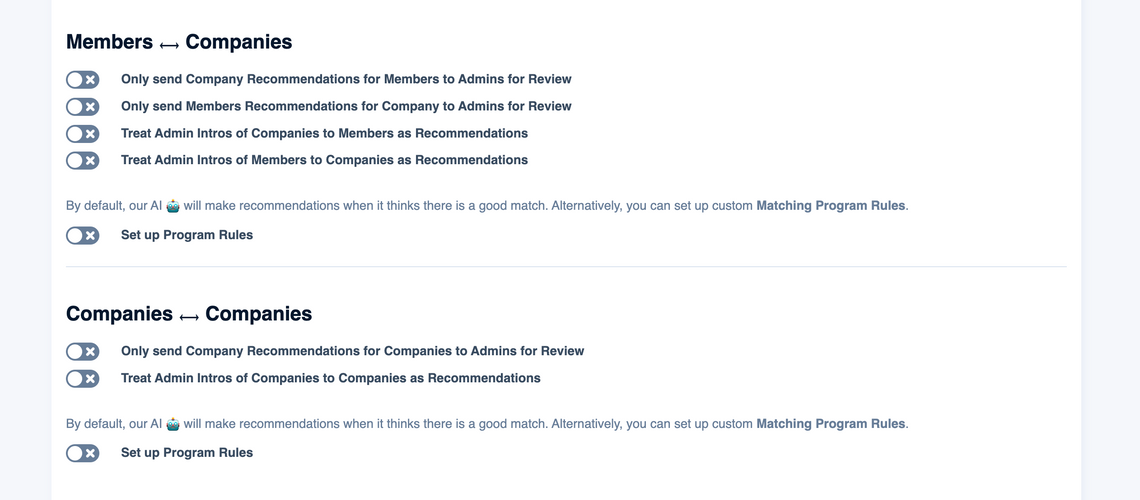
So you get one of each kind included with your plan "out of the box". Should you require additional Matching Programs, our Professional Services team has the tools to set up custom configurations for you. For example, you can have multiple different Member <> Member Matching Programs running concurrently. Please contact [email protected] or your ScaleGrowth account manager to learn more about this.
