
It is possible to setup any of your Spaces to require the visitors to Sign Up to access with a custom message.
To do this:
- Enter Admin if you aren't already
- navigate to the Space you wish to configure this for
- click Settings in the top right
- scroll down to the Access section
- look for Who can see this Space
- make sure you do not have
No AcccoutUser Group in there - (if you do, that will allow users without an account to see this Space)

- scroll down to the Upsell & Conversion section
- look for Use this Message for No Account users instead of Sign Up redirect
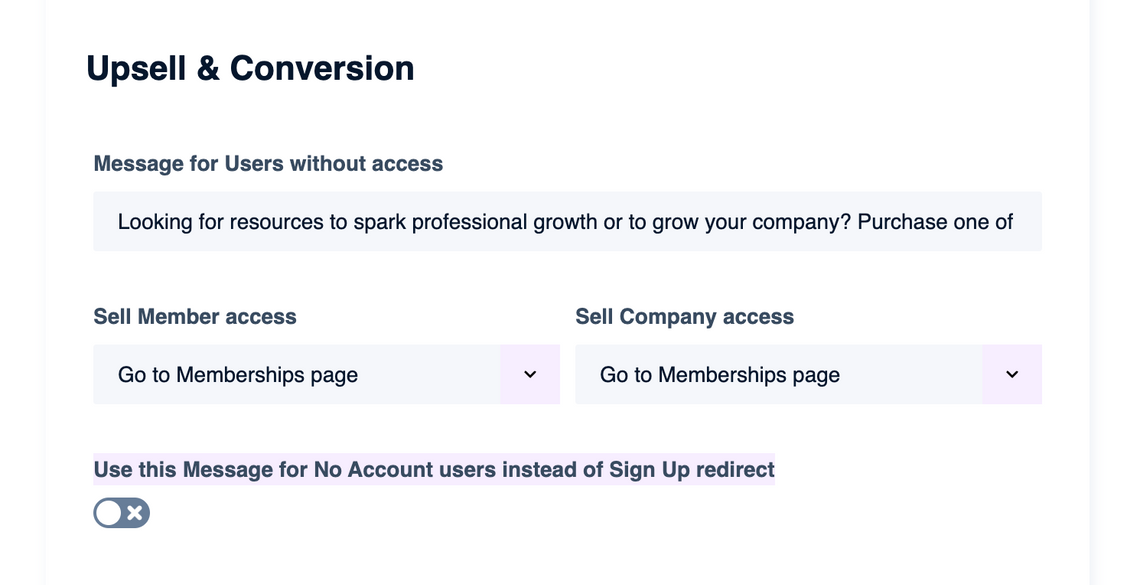
- enabling this setting will show the Message for Users without access to any visitors who are not logged in
- disabling this setting with immediately redirect them to Sign Up when trying to visit the Space
- note that if they already have an account and Log In, this flow will "remember" to take them back to the Space after they log in
