
Overview
Tag Sets are one of the most powerful tools in the ScaleGrowth platform – enabling structured, consistent tagging across profiles, content, conversations, programs, listings, events, and more. They play a crucial role in powering personalized matching and recommendations.
In this guide, we’ll explain:
- What Tag Sets are
- How they work across the platform
- How they fuel matching & recommendations
- Plan-specific Tag Set limits
- Best practices for setup and usage
📘 What Is a Tag Set?
A Tag Set is a special type of Smart Field where you – the platform admin – define a pre-set list of options (tags) that members or admins can select from.
Tag Sets are:
- Fully customizable
- Designed for platform-wide reuse
- Structured to power filtering, discovery, and matching
Example: You might create a Tag Set called Topics with tags like “Leadership,” “Career Growth,” “Marketing,” or “Community Building” – and use it across member profiles, content, and listings.
🌐 Platform-Wide Tagging: Where Tag Sets Can Be Used
Tag Sets are platform-wide, meaning they can be attached to virtually any object, including:
Member Profiles: Areas of expertise, industries, skills
Preferences: Topics of interest, needs, goals
Content: Articles, videos, learning modules
Listings: Marketplace items, opportunities, applications
Events: Webinars, workshops, community meetups
Programs: Courses, mentoring tracks, membership tiers
Conversations: Discussion threads, forums, topic groups
By using the same Tag Set across these areas, the platform can intelligently connect and recommend based on shared tags.
📊 Tag Set Limits by Plan
Grow Plan: Up to 3 Tag Sets
Scale Plan: Up to 6 Tag Sets
Enterprise: Custom
If you need additional Tag Sets beyond your plan’s limit, contact your Customer Success Manager to explore upgrade options or smart field design strategies.
🔍 How Tag Sets Power Matching
When Tag Sets are applied across Profiles, Preferences, and content, they enable powerful and structured matching logic that ties together what members offer, what they need, and what your platform provides.
Matching Examples:
- A member who prefers topics tagged “Career Growth” is matched with a program tagged “Career Growth”
- A member who offers support in “Leadership” (via Profile) is matched with another member who needs help in “Leadership” (via Preferences)
- A blog post or resource tagged “Marketing” is recommended to any member who has expressed interest in that tag
🎯 Profile vs. Preferences: Best Practices for Tag Sets
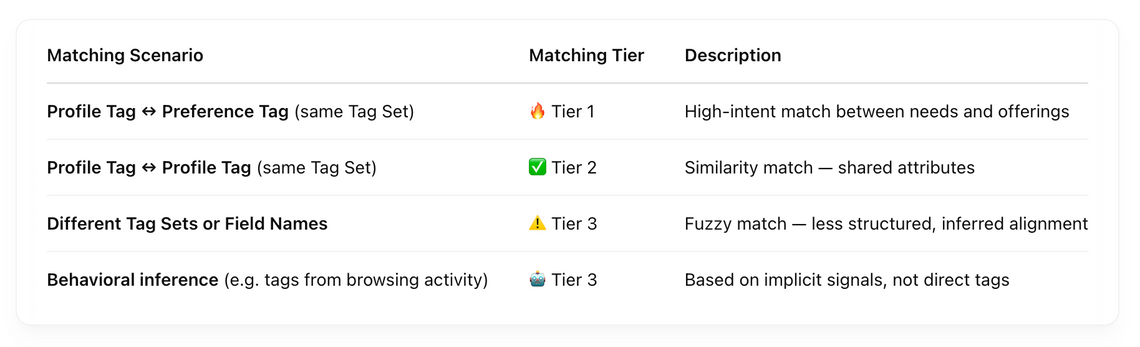
To unlock Tier 1 cross-matching, it’s important to use the same Tag Set across both the Profile and Preferences views:
- Tag Set: Topics in Profile → what the member can offer
- Preference: Tag Set: Topics in Preferences → what the member needs
This setup enables high-quality, intent-driven matching between supply and demand.
For more detail, see:
👉 Understanding Profile vs. Preferences Fields for Matching & Recommendations
🧠 Matching Strength Based on Tag Set Usage
🛠 Admin Tips for Tag Set Setup
- ✅ Use clear, easy-to-understand tag names
- ✅ Standardize formatting and capitalization across tags
- ✅ Avoid duplicating Tag Sets unless option lists are truly different
- ✅ Use each Tag Set consistently across multiple objects (e.g. Profiles + Content)
- ✅ Regularly review and clean up unused or overlapping tags
⚡️ Pro Tip: Tag Sets + Saved Search = Discovery Power
When members use filters powered by Tag Sets to create Saved Searches, they can:
- Subscribe to digests
- Get alerts when matching content or listings go live
- Revisit targeted search criteria anytime
This creates a seamless loop between structured filtering and proactive discovery.
Learn more:
👉 Using Saved Searches and Personalized Digests for Member-Centered Discovery
Related Articles
- Understanding Profile vs. Preferences Fields for Matching & Recommendations
- How ScaleGrowth Designed Its Recommendation Engine for Member Platforms
- Using Saved Searches and Personalized Digests for Member-Centered Discovery
- Using Platform-wide Tags
- Best practices for using Tag Sets
